Hello!
We have a few cases where a space / folder / project has more than one automation rule assigned to it, and the functionality of one is impacting the other as they are happening in the wrong order.
Please see below use-case scenario that illustrates the requirement:
- We have a rule applied at the Space level where, Trigger = New Item Created, Conditons = Custom Fields are blank, Action = Add item to "Tasks with Blank Custom Fields" folder
- We then have a rule applied to a Project (Top) within this space where, Trigger = New Item Created, Action = Populate Custom Fields as specified
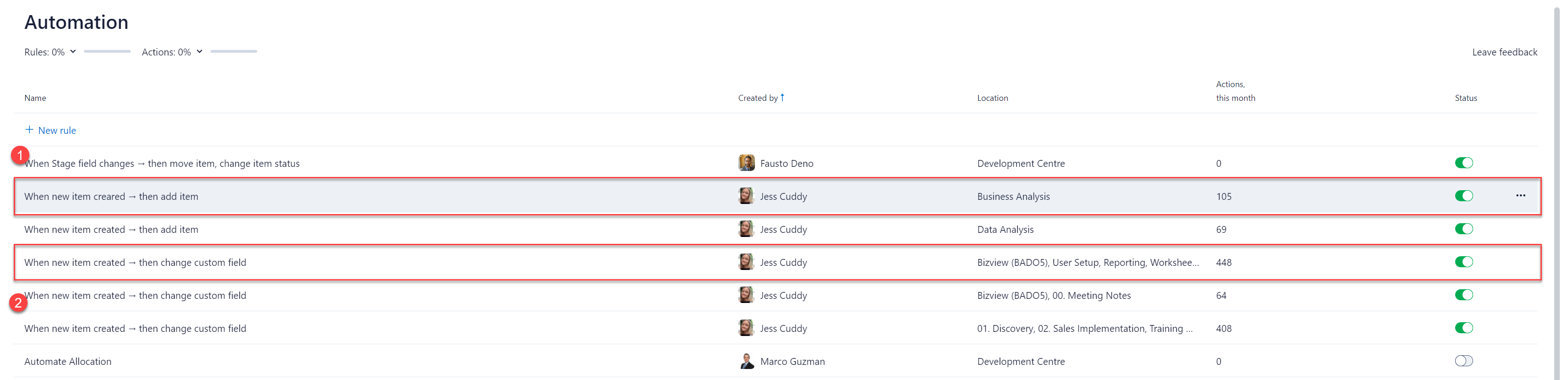
Automation Rule #1 takes place first every time, so tasks that have Custom Fields populated are being tagged into the Blank Custom Fields folder when they have actually been populated.
Is there any way for us to specify the order in which automation rules take place so we can avoid this conflict?
Any feedback from Wrike Community Team or Community Members on how to achieve this would be greatly appreciated. Thanks so much.



