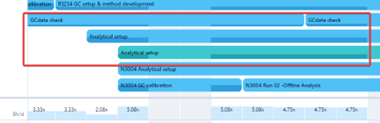
One of our current key issues in the Wrike functionality is the fact that the project name (project code) is NOT clearly visible in the workload overview.
Work-around would be to include the project code in each task name. but this is quite a administrative hassle in the creation of new task lines within a project, which can easily be forgotten or mistyped. (even when using blueprints or automations)
Preferred functionality would be that the project code would always be clearly visible in any of the Tools overviews (My to-do, Workload, dashboards, etc)
current situation Workload Chart
preferred situation Workload Chart
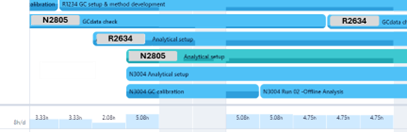
It would be ideal if the project name that is one level above the task is displayed. This means that for any given task, the system should show the project code directly above it in the hierarchy, regardless of whether the task is contained within a folder or directly under the project. Additionally, it would be even better if it is configurable whether the folder structure is considered or ignored. (so if the project code is displayed or the folder name)
current situation My-tasks / Dashboards
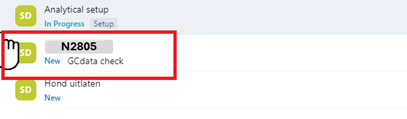
Already shows project/folder name, but not very clearly visible.

preferred situation My-tasks / Dashboards
Note: There are a lot of post where the subject of the project name visibility comes back. Most of these posts are now focused on work arounds of adding the project code as a prefix to the task name, via the blueprints and automations. But this is only symptom fixing and stays a annoying work around. For this reason I have posted my suggestion as a new feature request.
(Other users who encounter the same issue and like this proposed suggestion, please like the post so it will be picked up by the product team)




