Currently, the following automation trigger works in Wrike:
When date of [custom field] has passed / is approaching ---> then perform automation action. See image below for reference.
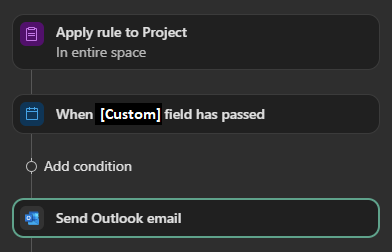
In one of my organization's spaces, we use a formula to calculate a date. This works as follows [Components Needed By Date]-[Days(calculated in hours) Required for Production]=[Date when Drawings are Required].
This produces a single date. I would like to subject this date to the same automation possibilities which are possible for a 'standard' custom field using a date value.
(If this would not be possible for a field which uses a complex formula, then perhaps for a formula field which simply 'copies'/'imports' the date from another field. i.e., I could create a new field called 'Date Automation' which simply takes the value [Date Automation]=[Date when Drawings are Required'].)
Alternative best-practices or solutions are also welcome.
Thanks in advance.