Hi everyone! 👋
My name is Slava and I am a Senior Product Manager at Wrike.
We’re excited to announce a highly requested update: Custom Field Descriptions are now available!
What’s new? 🆕
You can now add optional descriptions to your custom fields to bring more clarity and structure to your workspace. Whether you want to remind your team what a field is for or indicate who owns it, these descriptions help reduce confusion and help everyone move faster.
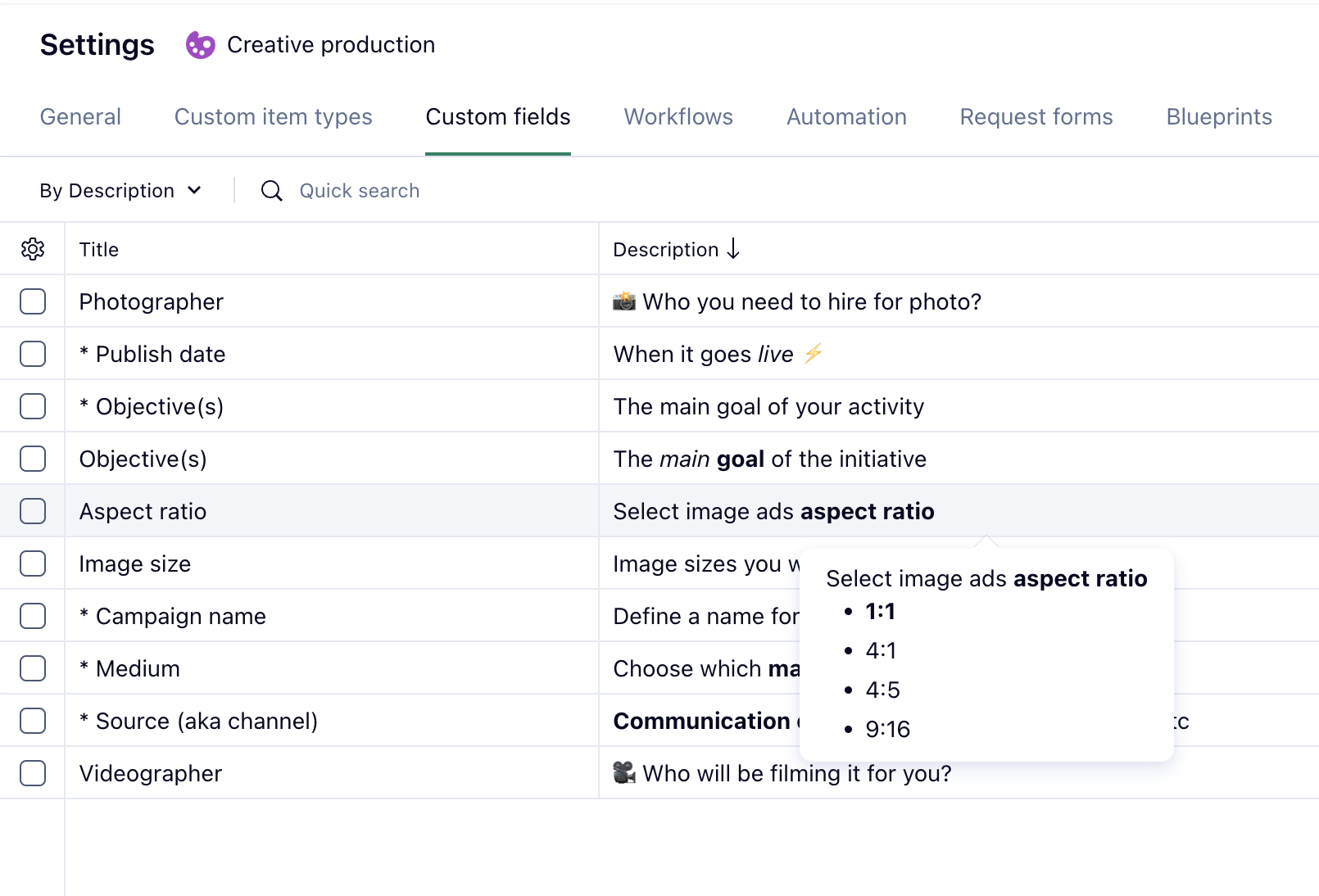
Important: 📌
Right now, custom field descriptions are available only to admins (Account and Space Admins) and users with the right to edit custom fields. They can view and manage these descriptions directly in the Custom Field Editor and Custom Field Management.
There is a 1000 character limit to the descriptions; they support rich formatting, and you can use Quick search to look for specific custom field descriptions.
Why does this matter? 🙋
We know that workspaces with dozens of custom fields can get messy quickly. This update is designed to:
- Reduce selection errors
- Improve reporting accuracy
- Make workspace setup more scalable for your team
Coming Soon: ➡️
We’re working on expanding this feature further! Soon, end-users will be able to see custom field descriptions when they search for custom fields or view them in context—just hover to see the description as a tooltip. Tooltips with field descriptions and other custom field information will appear in Table View, Item View, and custom item type configurations.
Have questions or feedback? Let us know below! 👇