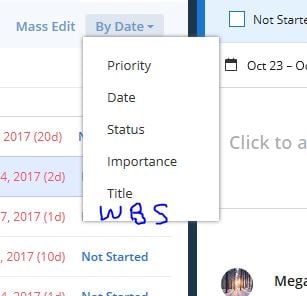
When creating a project in the table or list view, the tasks, behind the scenes, should be auto-assigned a WBS tag that preserves the order in which they are entered. Then they can sorted by WBS rather than alphabetical which seems to be the default. Project, Smartsheet, and many other tools preserve the order in which things are entered because most times there is a rhyme and a reason for the order they're entered.
For instance, I entered the following in the logical order:
Kitchen Cabinets (parent task)
Determine Finish
Order Cabinets
Schedule Installation
Installation
But when I exit and re-enter the list and/or table view, the tasks seem to be sorted alphabetically and/or I can sort them by date. I don't want to sort them by any other order than I've entered them in and I don't want to be stuck prefacing with 1.1, 1.2, 1.3, etc. That is a mess when adding in additional tasks in between already prefaced tasks.