Dependencies help specify how one task relates to another and they help you track the order tasks need to be completed in. You can view a task’s dependencies from the Task and Timeline Views.
We often get asked about choosing the right type of dependencies, so let’s take a look at each of the options.
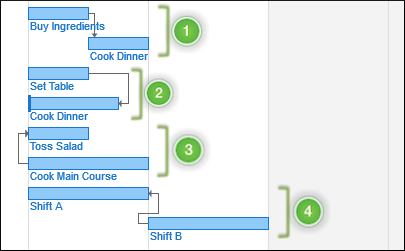
- Finish to Start: Task B can’t start until Task A has been completed. This is the most common type of dependency. Think of it as not being able to start cooking dinner (Task
 until you buy ingredients for it (Task A). 1
 - Finish to Finish: Task B can’t finish before Task A is finished. The tasks don’t need to finish simultaneously, but the first task needs to be completed before the second task can be finished. In our dinner example, the table should be set (Task A) before we finish cooking (Task . 2
- Start to Start: Task B can’t start before Task A starts. They don’t need to start simultaneously, but the first task should be in progress by the time the second task begins. When cooking dinner, it’s a good idea to start tossing a salad (Task only after you’ve popped the main course into the oven (Task A). 3
- Start to Finish (“Backward” dependency): Task A can’t finish before Task B starts. This type of dependency is rarely used, and an example of it can be shift work: in shift work, the relief shift worker has to arrive, clock in and start their shift, before the current shift worker can clock off and end their shift. If the relief shift is late, existing shift can’t finish. It can only finish once the following task has actually started. 4