TL;DR: You can now add multiple follow-up questions for each answer in request forms, and form responses can automatically cascade down to subitems and subprojects. Together, these two releases make complex work intake like multi-channel campaign requests dramatically simpler. Available on Business plans and above.
Hi Community! 👋
We're excited to announce two new Request Forms features - Multiple Follow-Up Questions and Cascading Form Responses to Subitems - that together unlock a significantly better end-to-end experience for complex work intake scenarios! 🎉
In short, Wrike now supports:
✅ Collecting the right details up front
✅ Distributing that context into execution automatically
These features were built on real feedback from the community. Many of you asked for them in threads like these:
Thank you for sharing your ideas and use cases. Let's take a closer look! 🙌
Multiple Follow-Up Questions Per Option
Previously, a select response could trigger only one follow-up question. Now, form builders can attach as many follow-up questions as needed to a single answer across Single-select, Multiple-select, and Importance question types.
How It Works
- Select any option in a Single-select, Multiple-select, or Importance question.
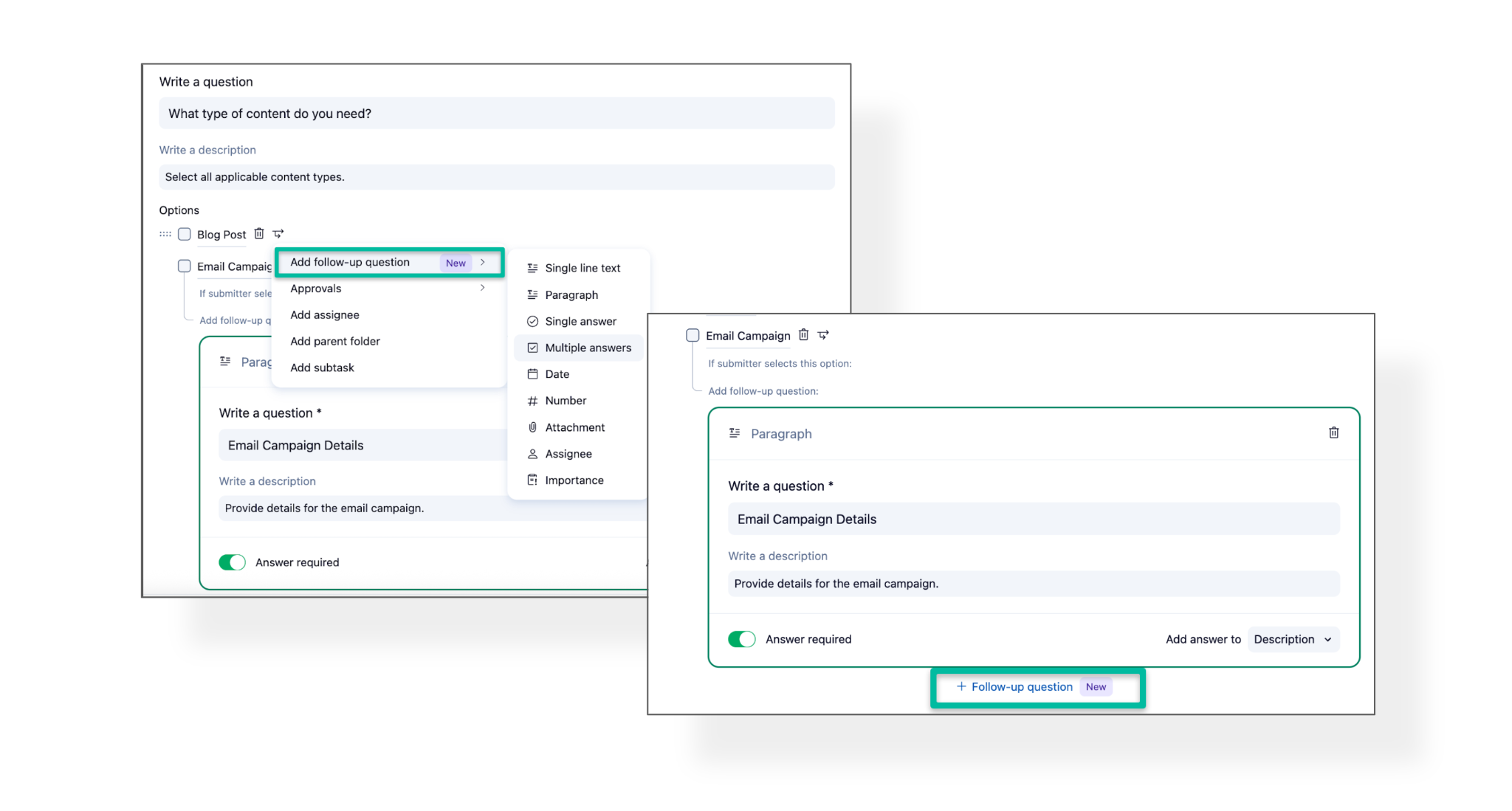
- Click the branching icon and choose Add follow-up question.
- For each additional one, click a new button "+ Follow-up question"
- Add as many follow-up questions as you need for that response
- Repeat for other options as needed.
- As soon as a submitter selects an answer, all relevant follow-up questions appear inline.
📝 Coming next: Deeper branching in request forms, with additional follow-up questions nested one level deep on existing follow-ups.
Cascading Form Responses to Subitems
When a form submission creates subitems or subprojects, the response data from the main request item can now be automatically pushed down to each of them.
Previously, if your form created a project with multiple subitems, high-level context like the project name, brief, or key custom fields values stayed only on the parent. That meant contributors had to dig up details from the parent item or manually copy-paste them into every subtask. This update changes that, helping teams save time and focus on their work.
💡 If this sounds familiar, it should! This release builds on the same concept as the recently announced Cascading Field Values. The goal is to make it easier for teams to pass important context from top-level work down to the tasks and subitems where execution actually happens, whether that context is set directly in the workspace or submitted through a request form.
What's Covered in This Release
- Item name - subitem names can include responses from the form
- Description - form answers flow into subitem descriptions
- Custom field - field values from the submission cascade to subitems
How to Enable Cascading
- Create a new or edit an existing request form.
- Navigate to the question you want to cascade across subitems.
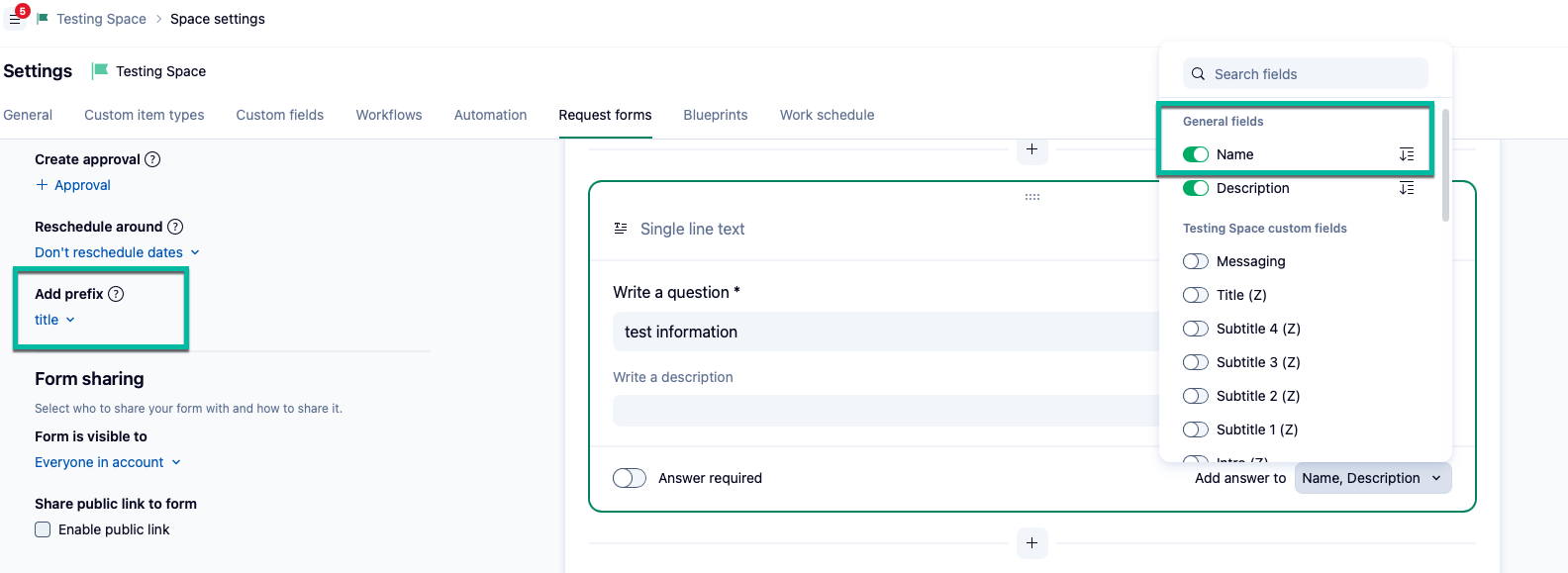
- Click the dropdown next to Add answer to.
- Hover over Name, Description, or Fields, and click the cascade icon.
- Click Publish or Save.

📝 Coming next: Support for cascading Assignees, alongside Importance values (already live as part of Cascading Field Values)
Why This Matters
This update brings a consolidated improvement to Wrike's work intake forms. It addresses both sides of the intake workflow:
- Multiple follow-up questions improve the required information capture
- Response cascading to subitems improves context sharing and execution readiness
So, Multiple follow-up questions let requesters provide complete, project-specific details in a single form flow and Response cascading to subitems ensures that context doesn't stay locked at the parent level and it flows directly into the work items where contributors need it.
Together, these updates make Request Forms significantly more powerful for teams managing multi-deliverable work like campaigns, creative production, or other structured requests involving several contributors.
Example in Action
A marketer opens one form, selects the assets they need (email, banner, landing page), answers a few follow-up questions specific to each asset, and submits. Wrike creates the project with subitems pre-populated with both the shared campaign context and asset-specific details. Contributors see exactly what they need in their own task and no digging up to the parent.
For more details, check out these Help Center articles: How Follow-Up Questions Work by Question Types and Map Responses to All Subitems.
👋 Also, say hello to @Svetlana Goldberg - she's the Product Manager behind these Request Forms improvements and will be actively following this thread . Feel free to direct your questions, feedback, or feature ideas her way!