TL;DR: Cascade field values to subitems in one click. Request Forms now support multiple follow-ups and auto-cascade responses. AI Agents can read and update Importance field. Whiteboards add an onboarding Welcome board and direct linking to Wrike items. Klaxoon exports now include richer engagement data. SCIM provisioning for Okta & Entra ID now supports user group and custom field syncing. Plus, celebrate April's Contributor of the Month and explore new community resources and upcoming webinars.
Feature Updates
We're thrilled to introduce Cascading Field Values that allows field values set on a parent item to automatically cascade down to all subitems with a single click, ensuring data consistency across every level. Now available to all accounts on Business plans and above.
What’s new?
- Cascade supported fields including Single Select, Multi Select, Text, Checkbox, People, Date, Link to Database and, Importance.
- Enable cascading in Table view, Work Item view, Blueprints, and Request Forms.
- New subitems inherit the parent’s cascaded values automatically.
- Flexible overrides and easy re-sync options.
- Cascading updates on item moves and multi-parent support.

For all the details, check out the dedicated Community Post and Help Center article.
- Request Forms: Multiple Follow-Up Questions & Auto-Cascading Responses 📋
We are excited to announce two complementary improvements to Request Forms that simplify complex work intake.
Form builders can now add multiple follow-up questions via a new button in the builder. Additionally, when a form creates subitems, campaign-level context automatically flows into each subitem, reducing manual copy-pasting.
What’s new?
- Attach multiple follow-up questions per option across Single-select, Multiple-select, and Importance question types.

- Automatically cascade form responses including item names, descriptions, and custom field values to subitems and subprojects.

Read more details in this Community Post and Help Center articles on Multiple Follow-Up Questions and Auto-Cascading Responses.
We're thrilled to introduce AI agents' ability to read and update the native Importance field! They can now intelligently detect urgency signals and update the field accordingly, improving automation and enhancing monitoring.
What’s new?
- AI agents can analyze task content and current Importance values.
- Agents can set Importance to High, Normal, or Low directly.

Two major updates are here for all accounts with the Visual Collaboration add-on (Paid or Trial).
What's new?
- Getting Started Whiteboard: No more staring at a blank canvas! New users will now see a pre-built, interactive welcome whiteboard in their Personal Space, designed to help them learn what whiteboards can do and how to apply them to everyday Wrike tasks. This is automatically generated for PRO license holders.

- Link Whiteboards to Wrike Items: You can now add or remove Wrike links (Projects, Folders, Tasks, or Spaces) directly from the Whiteboards list - making it easy to attach draft whiteboards to the right items when you're ready to share.
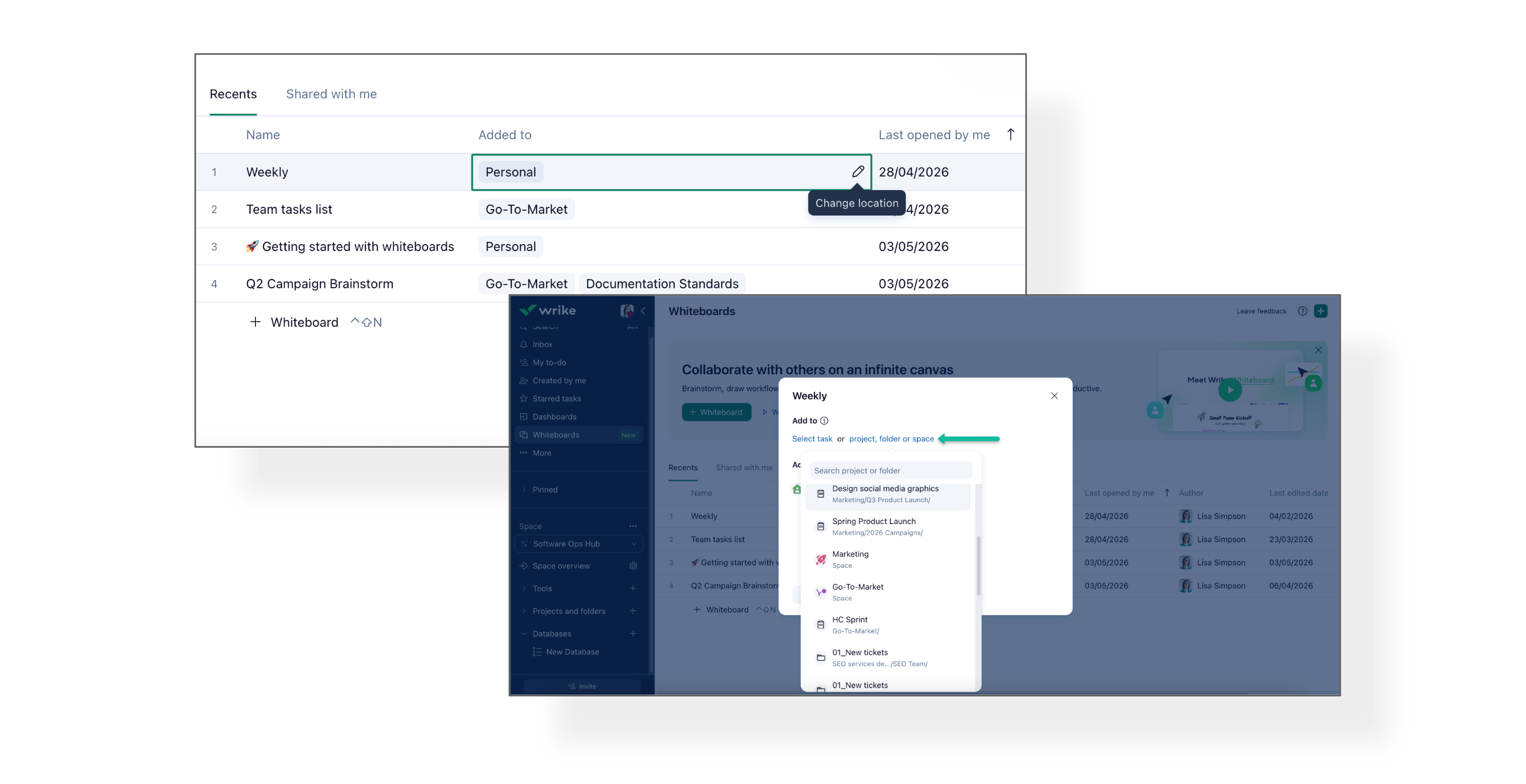
Read more in our Help Center article.
Activity exports from Klaxoon Suite (surveys, quizzes, memos, missions, and adventures) now include additional data fields to better track participant engagement and learning outcomes.
What's new?
Export Improvements include:
- First & last action date/times
- Individual user progression
- Individual user scores / success rate / points
- Number of replays
- Feedback rating & comment
- Availability: Export is available for PRO users
More details on our Help Center article here.
- SCIM Provisioning for Okta & Entra ID: User Groups & User Attributes Sync 🔐
We're excited to announce new enhancements to our SCIM API for Okta and Entra ID provisioning! These enhancements simplify provisioning processes, reduce manual work for admins, and help keep your Wrike environment in sync with your organization's identity management system.
What's new?
- User Groups Support: If a user is added to a group in Okta or Entra ID, they will now be automatically added to the corresponding group in Wrike. So, no manual updates needed.
- User Custom Fields Support: If a user has custom properties in Okta or Entra ID, these can now be mapped to User Custom Fields in Wrike and populated automatically, ensuring user data stays consistent and up-to-date across systems.
📝 Please note: To take advantage of these new features, account admins will need to configure group and custom field mappings in their Okta or Entra ID settings. Once set up, the integration will work seamlessly via the SCIM API.
For more information, refer to these Help Center articles:
- SCIM API
- SAML SSO Azure AD / Entra ID: User & Group Provisioning
- SAML SSO Okta: User & Group Provisioning
Community News
- Wrike AI Agents Live Session Recording 🧑💻
Missed the live session on Wrike AI Agents? Watch the recording to learn about AI Agents' capabilities, real use cases, and upcoming features.
Check out this Community Post for all the details, and watch the recording here.
- Upcoming Webinar: Start Faster With Ready-Made Workflows 🚀
Join the live Wrike Essentials session on May 20 at 10:30 a.m. PST to explore ready-made solutions and templates for faster adoption and scaling of workflows across teams.
Register here and find all the details in this Community Post.
- Community Question: How Do You Use Default Workflow? ❓
Alina from our Product team invites admins to share their experiences with the default workflow, including needs for locked transitions, approvals, and required fields.
Head over to this Community Post to share your experience!
- Template Tuesdays: Company Knowledge Base 📚
Discover the Company Knowledge Base template by community member @Ali Moses , designed to help teams capture, organize, and share knowledge across departments with built-in guidance, automations, and workflows.
Check out this Community Post for more details.
- Wrike Onboarding: What Is a Project in Wrike? 📁
We've shared a new onboarding post to help users understand how Projects work in Wrike. It explains what Projects are, how they differ from folders and tasks, when to use them, how to create them, and best practices for organizing work.
Read more in this Community Post.
- April 2026 Contributor Of The Month 🏆
Congratulations to @Florian Gascho for earning April's Contributor of the Month ! Thanks also to our other contributors for their outstanding contributions.
Check out the Community Post to congratulate and appreciate our winner!