Hi everyone 👋
We're thrilled to invite you to our QuickBooks integration beta! This integration is designed to automate and accelerate your invoicing processes by exporting time records from Wrike to QuickBooks, ensuring timely and accurate billing. It also enhances decision-making with real-time financial data synchronization.
Why QuickBooks?
Time tracking is the most adopted feature within our functionality for Professional services teams, showing a strong reliance on accurate time management tools. QuickBooks ranks among the top three ERP systems used by our customers and was identified as the most preferred in our recent Community survey.
What to Expect?
This initial beta focuses on engaging early adopters to gather feedback and fine-tune our mechanics. The integration provides solid core functionality for synchronizing the two systems, and new updates will follow every sprint.
Who Can Participate?
Any account starting with the Business plan can participate in the beta.
How Does It Work?
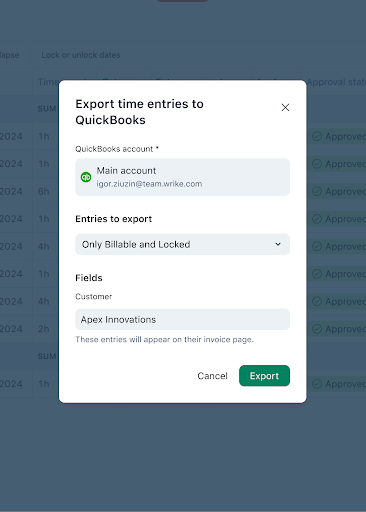
Manual Synchronization: Click the "Export to QuickBooks" button in the Timelog view, log in to QuickBooks, select from predefined filters, choose a client, and confirm the export.
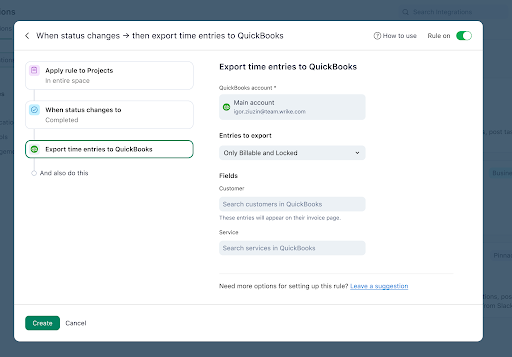
Export with Wrike’s Automation: Set up an automation rule in Wrike with your desired triggers and conditions, add the "Export to QuickBooks" action, authorize, set filtering criteria, define client, and the selected time entries will be automatically exported to QuickBooks upon rule triggering.
Coming Soon
We're planning to add several more features, including a separate column in Timelog for the status of exports to QuickBooks, the ability to filter entries in Timelog for exporting, control over permission via custom user types to use the integration, and more.
Your early feedback will help us prioritize these updates. Join us in refining this integration and making Wrike even more powerful! Please let us know below if you’d like to participate in this beta 👇


