Full Timesheet access is now available to Contributors—they can track and submit hours just like Regular users. Plus, admins can give Contributors the right to create and edit Timesheet reminders as needed. This right can be turned on by account admin for Contributor user type.
-Create and edit Timesheet reminders (permission managed by the account owner or admin in User Types settings)
These updates ensure Contributors have all the tools they need for efficient and transparent time tracking!
- Work Schedule: Flexible Work Schedules for Unassigned Tasks (Enterprise and Pinnacle accounts) 📊
You can now change the work schedule for unassigned tasks directly in Table and Item views!
Whats New?
- Default Schedule for Spaces: Space admins can choose one of the existing account schedules to set as the default schedule for their Space.- All newly created tasks will automatically be linked to the selected schedule.- The Gantt chart's schedule layout will now display your chosen Space schedule instead of the general “Default schedule.”
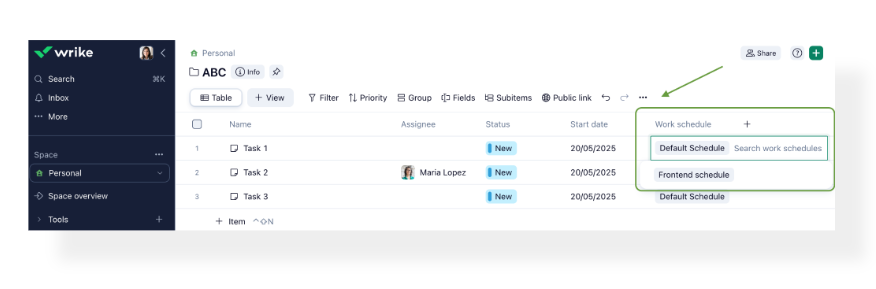
Note: These changes apply only to unassigned tasks. If a task is assigned to a user, it will automatically adopt that user’s personal schedule, including their time off and other exclusions.
Take advantage of this update to better align your team’s work schedules and streamline task management in your workspace!
- Databases: Field-Level Access Rights (Pinnacle Accounts) 🔐
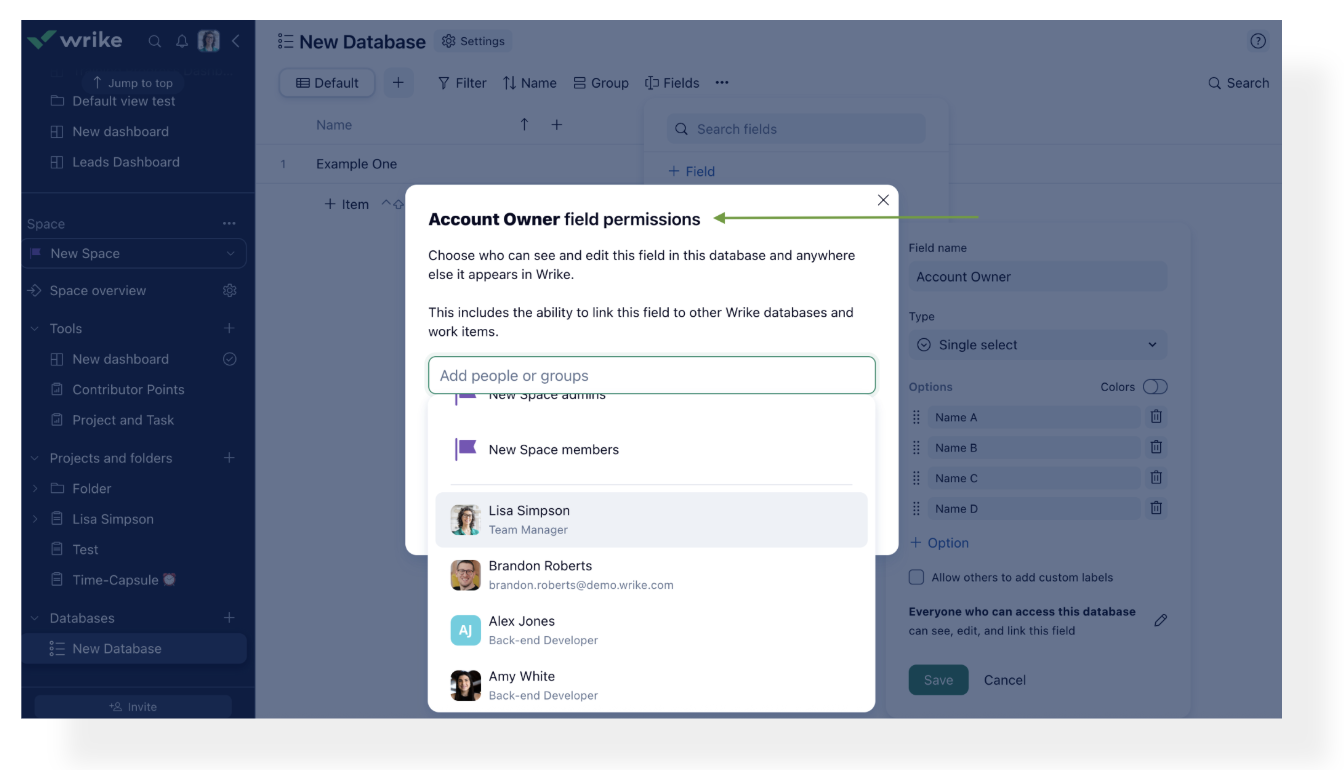
We're thrilled to announce the launch of Field-Level Access Rights for Database—one of our most requested security enhancements. This powerful new feature empowers database owners with precise control over who can view and edit specific fields within their databases.
Why Field-Level Access Rights?
-Protect sensitive data: Safeguard confidential information while still sharing necessary database context with your team.
-Enable selective collaboration: Display only the relevant fields to each collaborator, keeping confidential information hidden.
-Scale secure data sharing: Easily manage secure access across projects and among different stakeholders.
What's New?
Database Owner Control:
-Set field-level permissions directly from the "Change field settings" dialog.
-Choose exactly who can view or edit each field.
Granular Field Permissions:
-Hide sensitive fields such as contract values, pricing, or confidential notes.
-Apply permissions consistently across all uses of your database in Wrike.
Note: Mirror fields will automatically inherit permissions from their corresponding lookup fields.
How to Get Started?
- Navigate to your database- Click the field permissions icon next to any field.- Select the users or groups who should have access to that field.
We’re excited to announce that you can now filter options in Link to Database custom fields within request forms! This update allows you to display only the most relevant options to users, based on their previous selections, reducing errors and streamlining incoming data.
Note: Access to this feature requires Datahub as all data is stored there. Both single-select and multi-select questions are supported, and currently, filtering to Link to Database custom fields is only available in request forms.
Community News
- Webinar: Resource Management, Maximize Your Team’s Potential! 💫
Join us for an info-packed webinar to discover how Wrike’s resource management feature can help you maximize your team's potential.
Click here to know more on what’s covered in this webinar.
📅 When?
Date: May 27
Time: 9 a.m. PST