In my company we've been trying to put the new Wrike features to a creative usecase.
We used the new Requestform features to develop a Meeting. In retrospective maybe something similar that we will see this week on the deminar concerning the Klaxoon acquistition, but we will see.
In a nutshell we fill out a form, and then do the meeting, where we create the work using the Meeting Minutes essentially.
Using the data provide to generate a "Meeting Type" in the correct location, adjust the description and title.
Additionally all meeting types are in a root hidden location tagged as well, where special automations come into play (archiving when done, reminders etc.)
This has been used to automise a lot of standard Open Item List tasks. As well as keeping track of subtasks.
One of our better processes/systems we've set up using the new features
This is how the requestform looks:
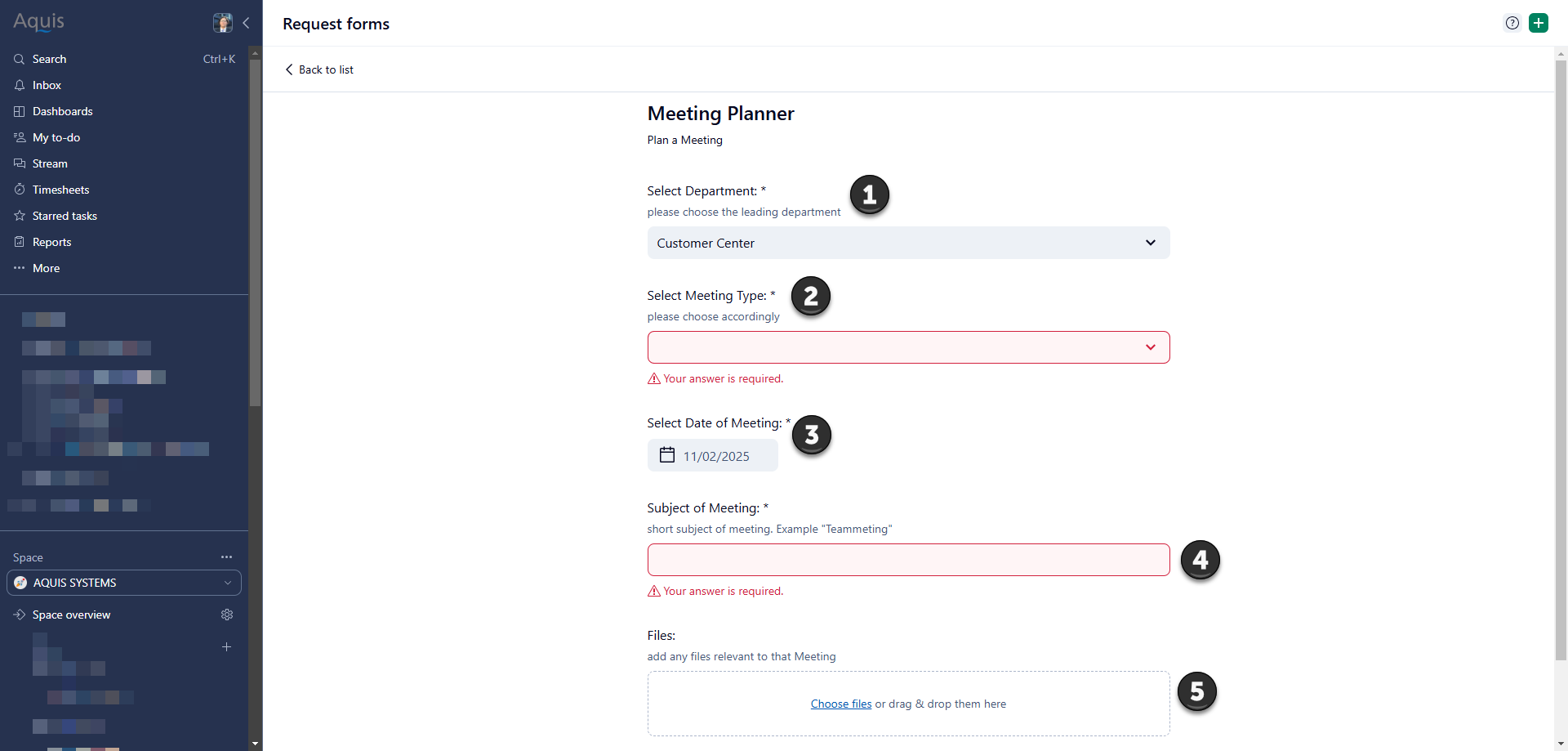
1) Selection of department.
-> Here you can select the Department this does the following:
A) Select the correct subquestion
 relinks it to the correct location with the space
2) Select Meeting Type
-> Here you can select the usergroup/ The type this does the following:
A) Take the correct subtask
Sets a customfield (which will be filtered later on) (Variaous, Jour Fixe, Internal)
3) Date of Meeting does the following:
-> Adds to the title
-> Reschedules accordingly
4) Subject of Meeting does the following:
A) Sets Task Title
5) is a standard for every request form for us. Oppertunity to insert a file or something similar.
Automations:
 This is a Automation rule, based on our Meeting ItemType.
Specifically for our Inside Sales Team.
When all Subitems are done, we are informing the Meeting Owner (Usually the Teamlead) that all subitems are completed.
This one of many that we have for each department.
Reminder we do simillarly. Each subitem which is overdue, gets an @Message and the Meeting Owner is also informed via an @Message.
This is how our inside Sale now manages all work discussed in a Teammeeting.
They write it down as bullet points in the meeting.
Select it, and generate subtasks via the Wrike AI.
And get back straight to working, from the feedback I got from the Teamlead this has helped them a fair bit organising work and spending less time on catchups.




