Feature Updates
We’re excited to introduce one of our most-requested features: Folders in the Tools section! Now you can easily organize your side panel by grouping Dashboards, Reports, Calendars, and other tools.
Create logical categories by team, product, year, or any structure you need—making it quicker than ever to find and manage your tools.
What’s new?
- Create custom folders in the Tools section to organize all your tool types
- Nest folders within folders with unlimited depth, allowing for highly customizable structures
- Effortlessly organize your workspace with drag-and-drop and renaming options
- Folders are sorted alphabetically, making navigation quick and intuitive
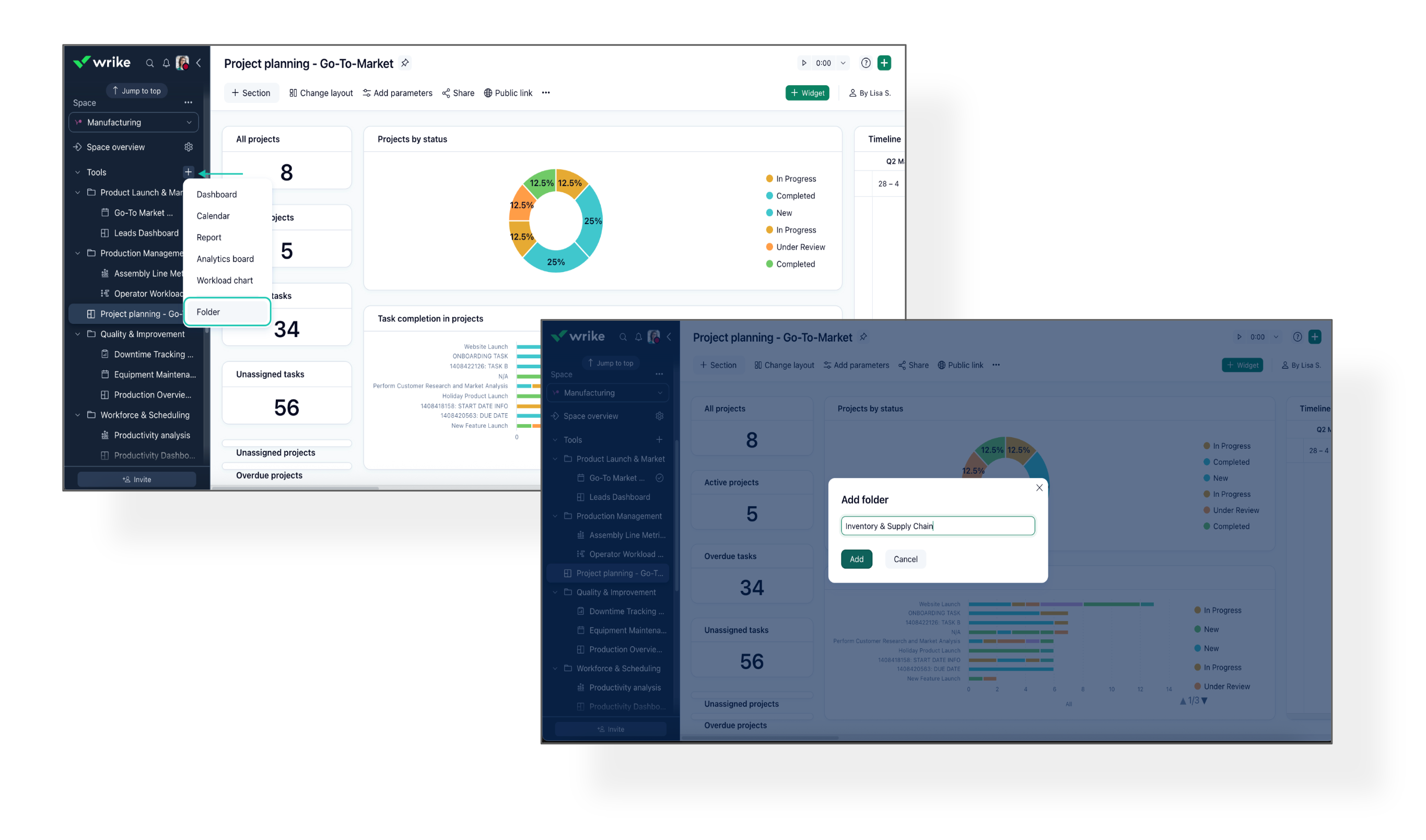
❗️Please note that deleting a folder will also remove all items contained within it. Additionally, folders are excluded from the pinned section.
Based on popular feedback, we’ve made it even easier and more intuitive to view and manage Wrike Views.
Here's what’s new:
- Bulk Copy & Set Default Views: You can now copy views in bulk and set a new default for all selected locations at once.
- More Visible Views: Projects and folders can now display more than just three views. The number of visible views adjusts to your screen size, so it's easier to access exactly what you need.
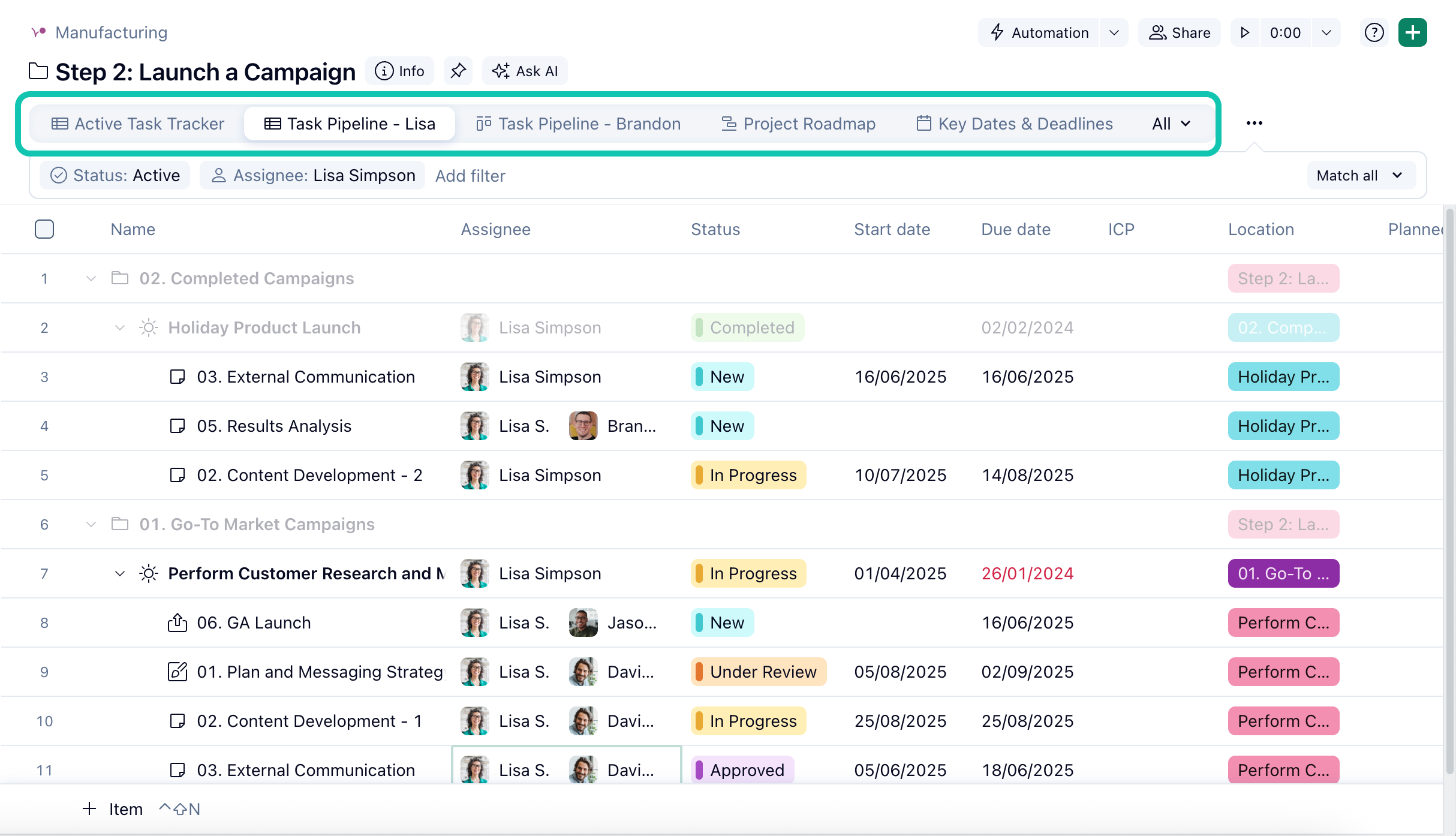
- Mobile App Updates (iOS and Android): New Filtering & Easier Approvals 📲
The Wrike mobile app just got even better, bringing you updates that help you manage work seamlessly—no matter where you are.
What's New:
- Filtered Activity Streams (iOS & Android):
You can now filter activity streams in any task or project—choose to view only comments or see all updates, cutting through clutter and helping you find what matters, faster.
- Edit Task Approvals On the Go [iOS] :
Now you can edit draft approvals directly from the mobile app, giving you more flexibility and faster turnaround.
- Bug fixes & Performance Improvement:
- Improved speed and reliability accessing tasks via Inbox
- Space overview now loads as expected
- Table view UI improved on Tablet devices
- Comment threads are now always scrollable during navigation
Community News
- Share How You Onboard in Wrike 🚀
We’re gathering feedback on how teams use Wrike to welcome new hires and streamline onboarding. Have tips, challenges, or suggestions?
Share your thoughts here to help us make onboarding in Wrike better for everyone.
- Live Webinar: Cut Your Approval Time In Half ✅
Join us on
June 17 at 9 a.m. PST for a hands-on session all about streamlining the approvals process in Wrike. Learn best practices, see real-world examples, and get live answers to your questions.
Register now on Wrike Discover!
- New Video: Wrike + Klaxoon Integration ▶️
Brainstorms to action, made easy!
Watch our new video to see how Klaxoon boards and Wrike seamlessly connect, helping you turn ideas into real tasks.
- Wrike-Up Wednesday: Wins Worth Sharing! 🎖️
What’s your latest quick win, big or small? Join this week’s Community thread to share your achievements and cheer others on.
Drop your win here!